
We do photos.
How to Get Photos from Wedding Guests with a QR Code
Updated November 24, 2026
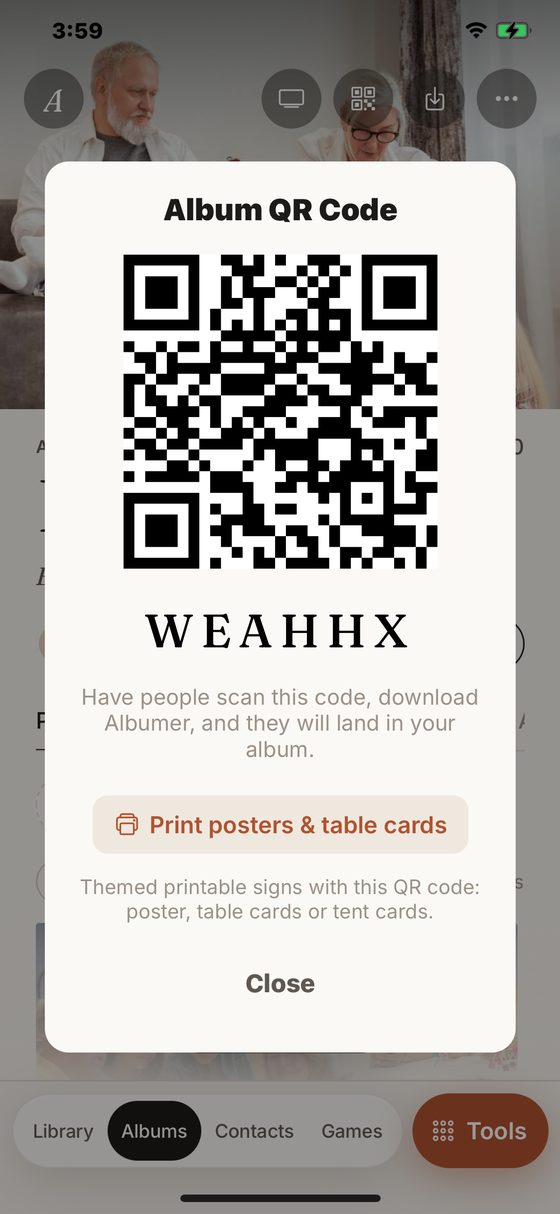
To get photos from your wedding guests, make a shared album in Albumer and print its QR code on a poster, table cards or tent cards. Guests scan the code, install the free Albumer app, land in your album and add their photos and videos at full size. Making the album, the QR code and the signs is free.
How to set up a wedding photo QR code
- Download Albumer and make a free account.
- Open Events, tap New event and give it a name, like your names and the date.
- Albumer makes a QR code and a short code for the event.
- Tap Print signs and table cards. Pick a wall poster, table cards or tent cards, pick a theme, and add a message if you like.
- Print the signs at home or save them as a PDF and send them to a print shop.
- Put the signs at the entrance, on the tables and by the bar.
On the day, guests scan the code with their phone camera, install the free Albumer app and land in your album. Every photo they add shows up for everyone in the album.
Printable signs for your tables
| Sign | Size | Where it goes |
|---|---|---|
| Wall poster | 8.5 x 11 in | The entrance, the bar, the photo booth |
| Table cards | 4 x 5 in, four to a page | Each guest table |
| Tent cards | Folds in half, 8.5 x 5 in | Tables, so both sides can read it |
Eight themes to match your wedding: Elegant, Classic, Floral, Rustic, Retro, Festive, Party and Spooky. You can also download just the QR code and add it to your own invitations or programs.
Tips to get more photos from guests
- Tell people early. Put the QR code on your wedding website or in your invitation so guests have the app before the day.
- Have the DJ or host mention it. One announcement after dinner brings in a wave of photos.
- Put it on the TV. Cast to TV plays the album as a slideshow on any TV with a web browser. Guests love seeing their photos come up.
- Play a game. The photo scavenger hunt has a Wedding Guest list: the rings, the cake, the first dance and more.
- Keep the surprise. With Disposable Camera, everyone's photos stay hidden until the time you choose, like the morning after. Disposable Camera is part of Albumer Basic and Premium.
Why guests use the Albumer app
Guests scan the code and install the free Albumer app. In the app they can see everyone's photos, not just their own, save the ones they like at full size, and keep adding photos after the wedding. It works the same on iPhone and Android.
After the wedding
- Save everything. Save album to phone downloads every photo at the size it was taken.
- Close the door. Stop new joins from QR codes keeps the album to the people already in it.
- Organize. Put photos into folders like Ceremony, Reception and Dancing.
- Print. Order prints from the Walgreens nearest you and pick them up at the store.
More guides
- Best free wedding photo sharing apps (2026)
- How to share photos from iPhone to Android without losing quality
- Photo scavenger hunt ideas
Frequently asked questions
How do I get photos from my wedding guests?
Make a shared album in Albumer, print its QR code on a sign or on table cards, and put them where guests will see them. Guests scan the code, install the free Albumer app, land in your album and add their photos.
Is the Albumer wedding QR code free?
Yes. Making the album, the QR code and the printable signs is free. Albumer Free gives you 5 GB of storage. For a big wedding, Albumer Basic (50 GB) or Premium (200 GB) gives you more room and no ads.
Do guests need to download an app?
Yes. Guests scan the QR code, install the free Albumer app, and land in your album when they sign in. In the app they can see everyone's photos and keep adding after the wedding.
Do guests' photos stay full quality?
Yes. Albumer keeps the size the photos were taken at, so you get the same photos your guests took.
Can I show the wedding photos on a TV?
Yes. Cast to TV plays the album as a slideshow on any TV with a web browser, and new photos join the slideshow as guests add them.
Can I stop new people joining after the wedding?
Yes. As the album owner, choose Stop new joins from QR codes in the album menu. People already in the album keep their access.